Observability

View live metrics across CPU, memory, GPU, and workloads

Replace fragmented dashboards with a single operational view. In Cloud Admin, open Monitoring & Ops → Observability for Prometheus-backed charts, fleet inventory, and drill-downs—from executive summaries to node and pod forensics—without embedding Grafana or juggling URLs.

Product walkthrough

Live metrics across your fleet

Every frame below is a real Cloud Admin screen—paired with plain-language context so you know what you are looking at and why it matters operationally.

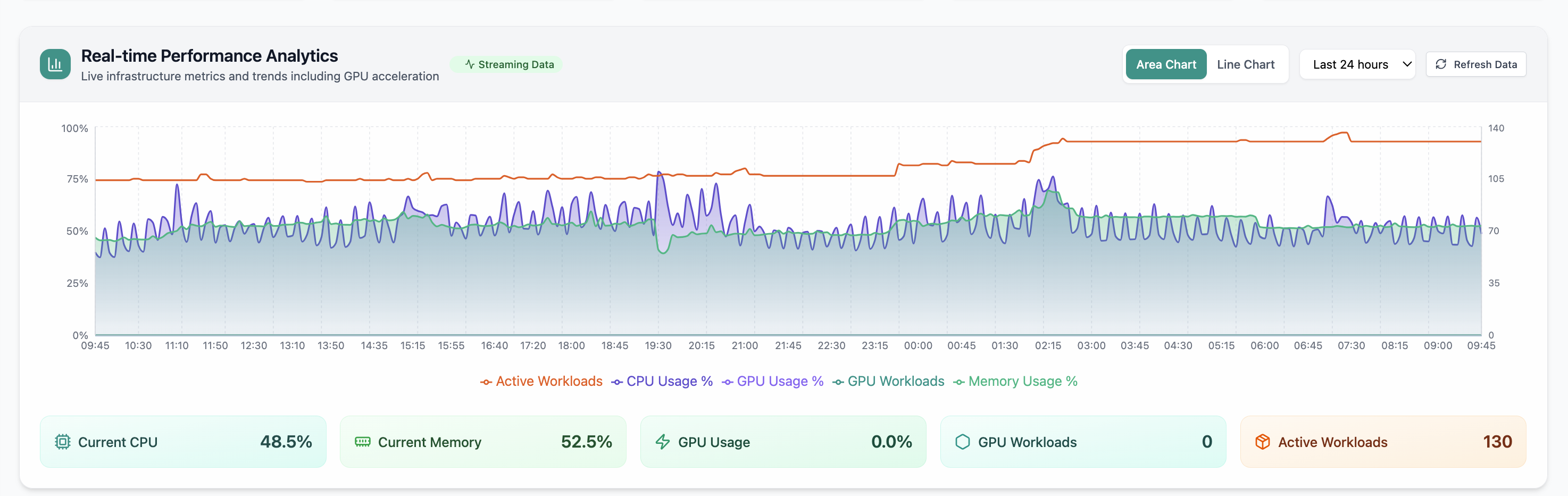
Real-time Performance Analytics area chart for CPU, memory, GPU, and workloads over 24 hours.
01 of 12 Cloud Admin

Real-time Performance Analytics

Real-time Performance Analytics area chart for CPU, memory, GPU, and workloads over 24 hours. Real Cloud Admin UI for Monitoring workspace—what operators see daily and what to do next.

  • GPU and inference signals stay beside Kubernetes metrics
  • Dense data stays readable at full size (click to zoom)
  • Fits into the broader FusioNative operational workflow

Click the screenshot to open full size, zoom, and pan.
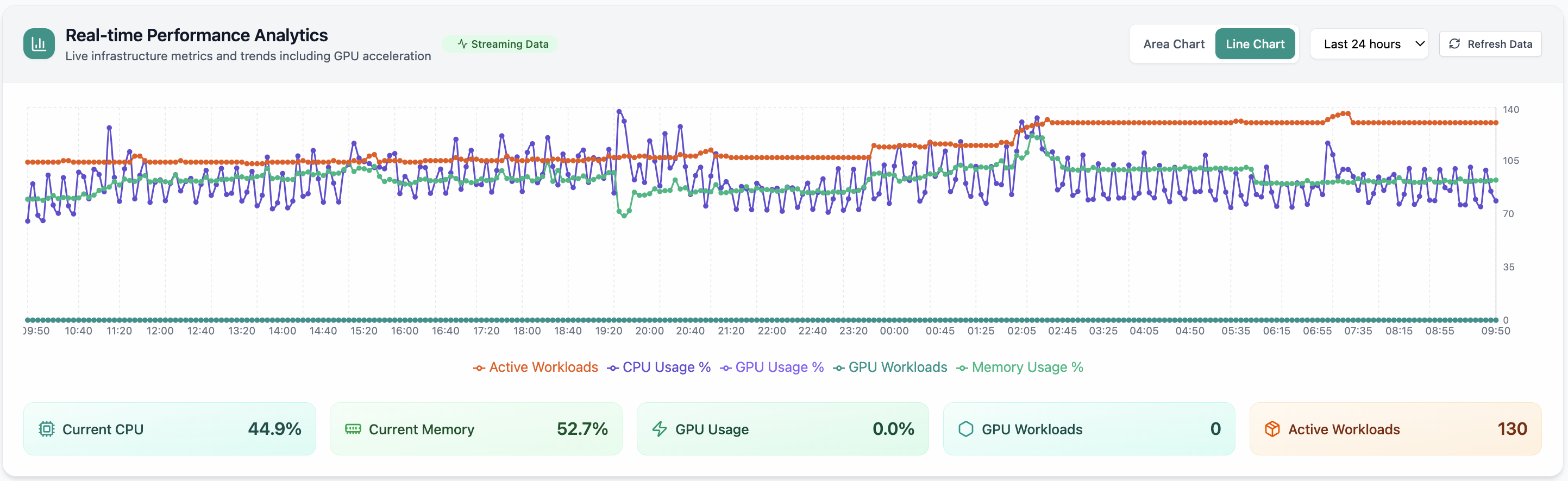
Real-time Performance Analytics line chart with metric summary cards.
02 of 12 Cloud Admin

Performance trends

Historical trends reveal whether usage is seasonal, spiking, or creeping—real-time performance analytics line chart with metric summary cards. Pair with capacity planning before users feel pain.

  • 24h+ history shows normal vs abnormal behavior
  • Compare peaks to limits and headroom
  • Export-friendly view for change windows and capacity reviews

Click the screenshot to open full size, zoom, and pan.

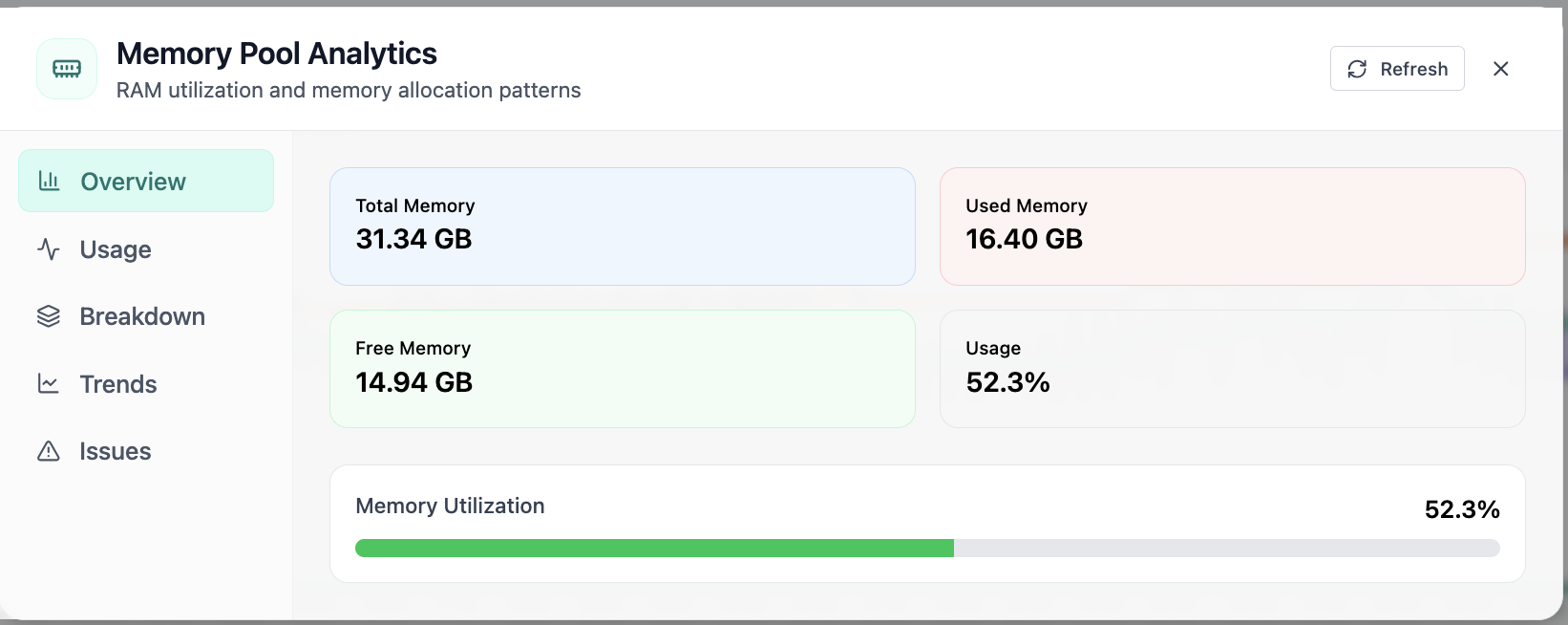
Memory Pool Analytics overview with total, used, free memory and utilization.
03 of 12 Cloud Admin

Memory Pool · Overview

In Memory Pool, the Overview view answers one operational question at a time—memory pool analytics overview with total, used, free memory and utilization. Part of Monitoring workspace; use it when you need evidence before changing limits, scaling, or opening a ticket.

  • KPI strip shows the numbers leadership cares about first
  • Charts link utilization to time so you spot spikes quickly
  • One click into deeper tabs when something looks off

Click the screenshot to open full size, zoom, and pan.

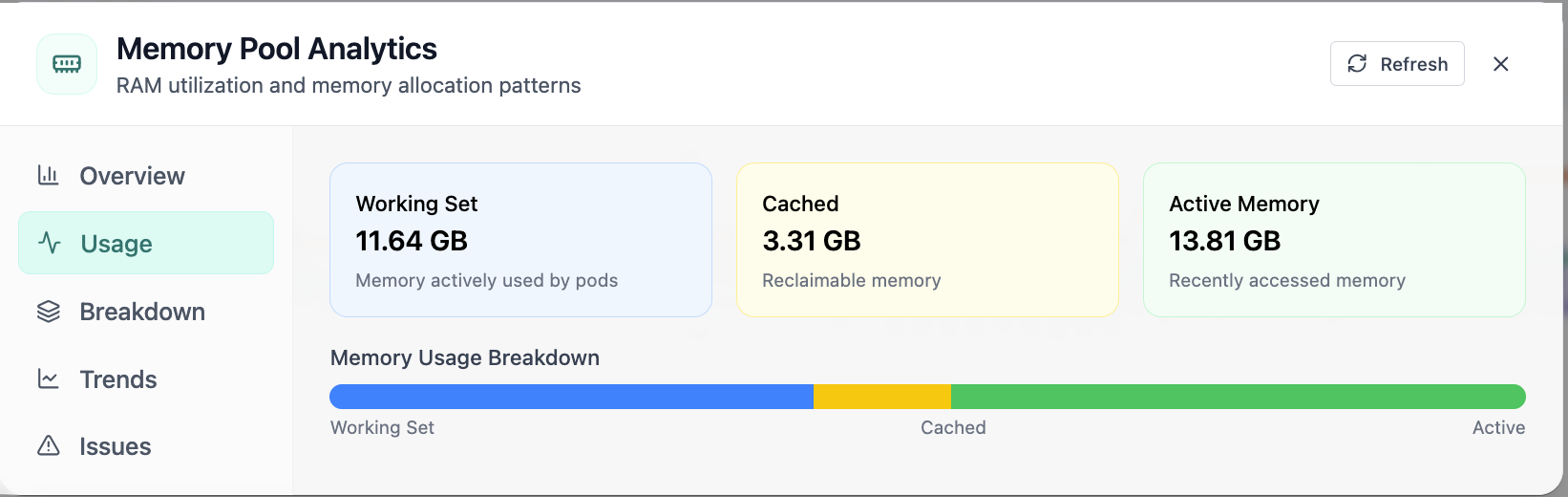
Memory Pool Analytics usage tab with working set and cached memory.
04 of 12 Cloud Admin

Memory Pool · Usage

In Memory Pool, the Usage view answers one operational question at a time—memory pool analytics usage tab with working set and cached memory. Part of Monitoring workspace; use it when you need evidence before changing limits, scaling, or opening a ticket.

  • Matches the live Cloud Admin layout your teams will use
  • Dense data stays readable at full size (click to zoom)
  • Fits into the broader FusioNative operational workflow

Click the screenshot to open full size, zoom, and pan.
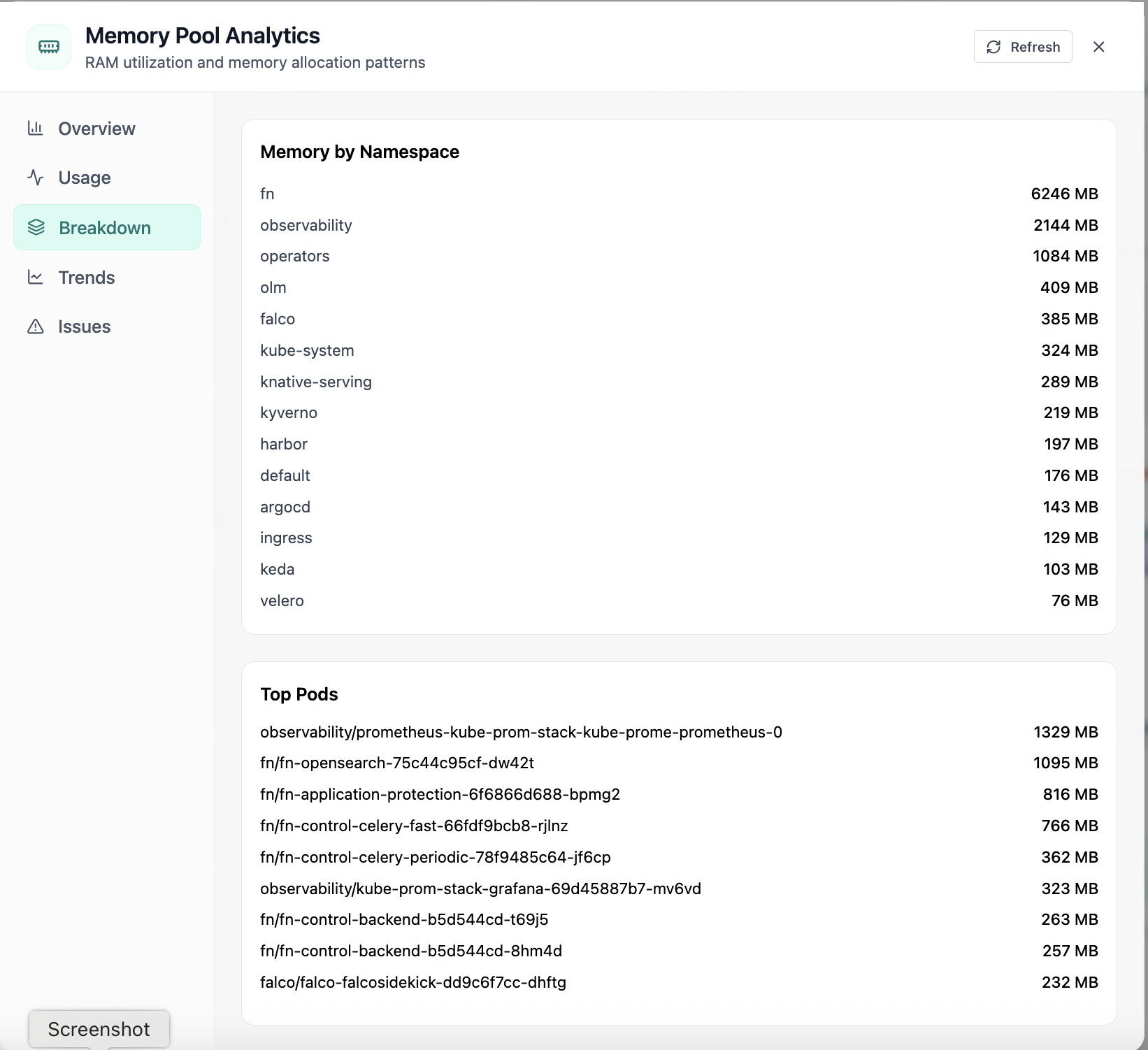
Memory breakdown by namespace and top memory-consuming pods.
05 of 12 Cloud Admin

Memory Pool · Breakdown

In Memory Pool, the Breakdown view answers one operational question at a time—memory breakdown by namespace and top memory-consuming pods. Part of Monitoring workspace; use it when you need evidence before changing limits, scaling, or opening a ticket.

  • Matches the live Cloud Admin layout your teams will use
  • Dense data stays readable at full size (click to zoom)
  • Fits into the broader FusioNative operational workflow

Click the screenshot to open full size, zoom, and pan.
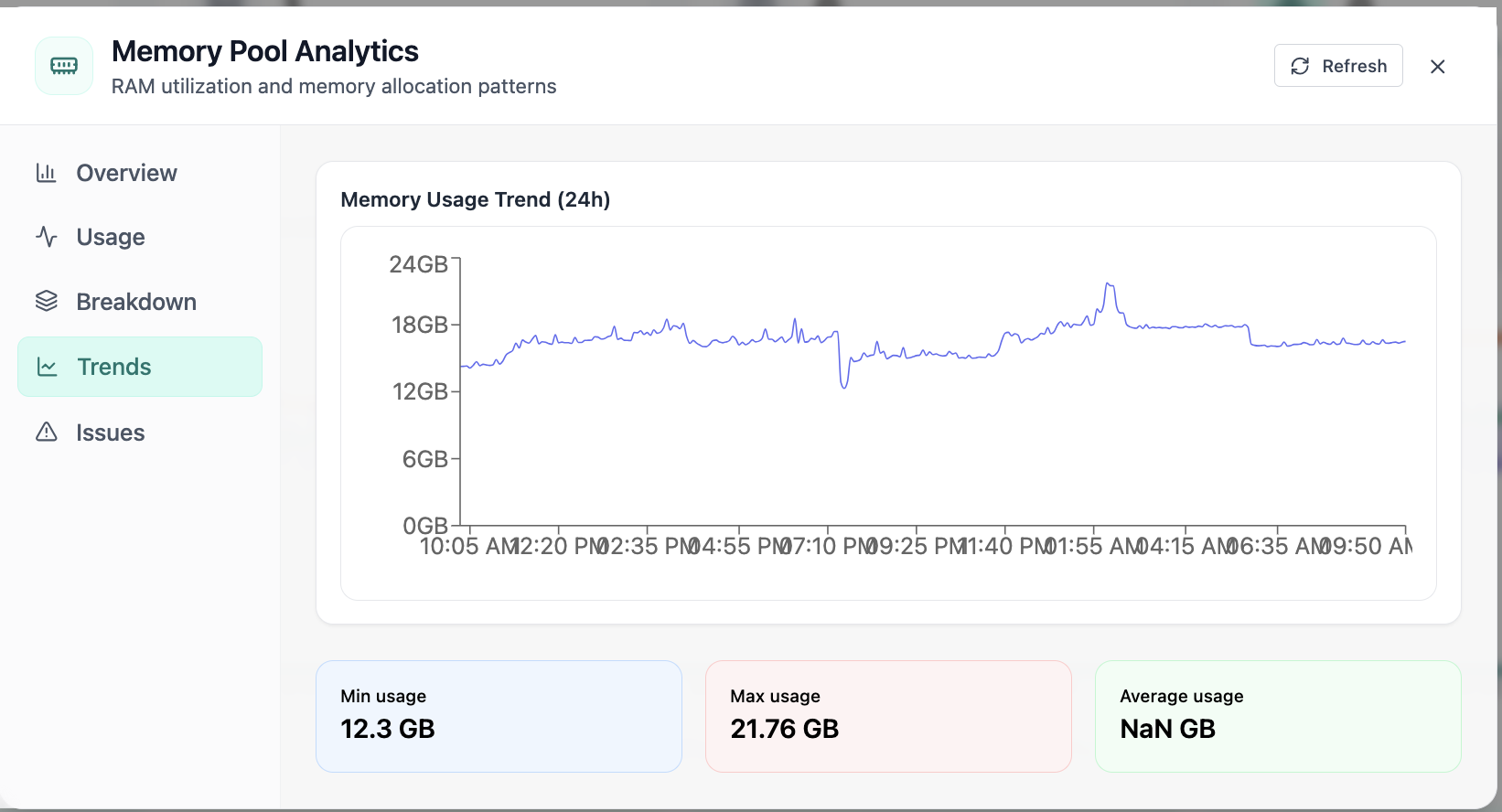
24-hour memory usage trend with min, max, and average.
06 of 12 Cloud Admin

Memory Pool · Trends

In Memory Pool, the Trends view answers one operational question at a time—24-hour memory usage trend with min, max, and average. Part of Monitoring workspace; use it when you need evidence before changing limits, scaling, or opening a ticket.

  • 24h+ history shows normal vs abnormal behavior
  • Compare peaks to limits and headroom
  • Export-friendly view for change windows and capacity reviews

Click the screenshot to open full size, zoom, and pan.

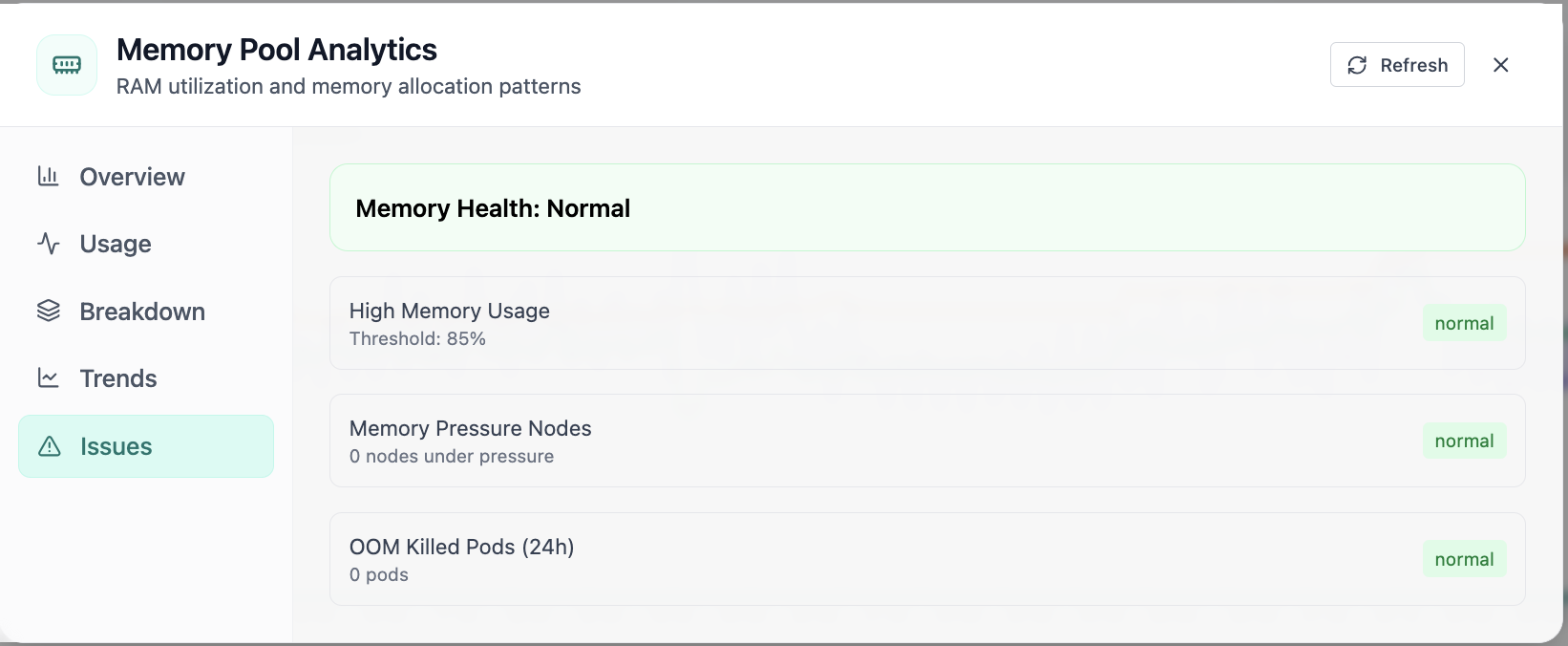
Memory health issues tab with pressure and OOM checks.
07 of 12 Cloud Admin

Memory Pool · Issues

In Memory Pool, the Issues view answers one operational question at a time—memory health issues tab with pressure and oom checks. Part of Monitoring workspace; use it when you need evidence before changing limits, scaling, or opening a ticket.

  • Problems ranked so the noisiest failures surface first
  • Enough context to assign an owner without opening five tools
  • Clear next step: scale, restart, patch quota, or escalate

Click the screenshot to open full size, zoom, and pan.

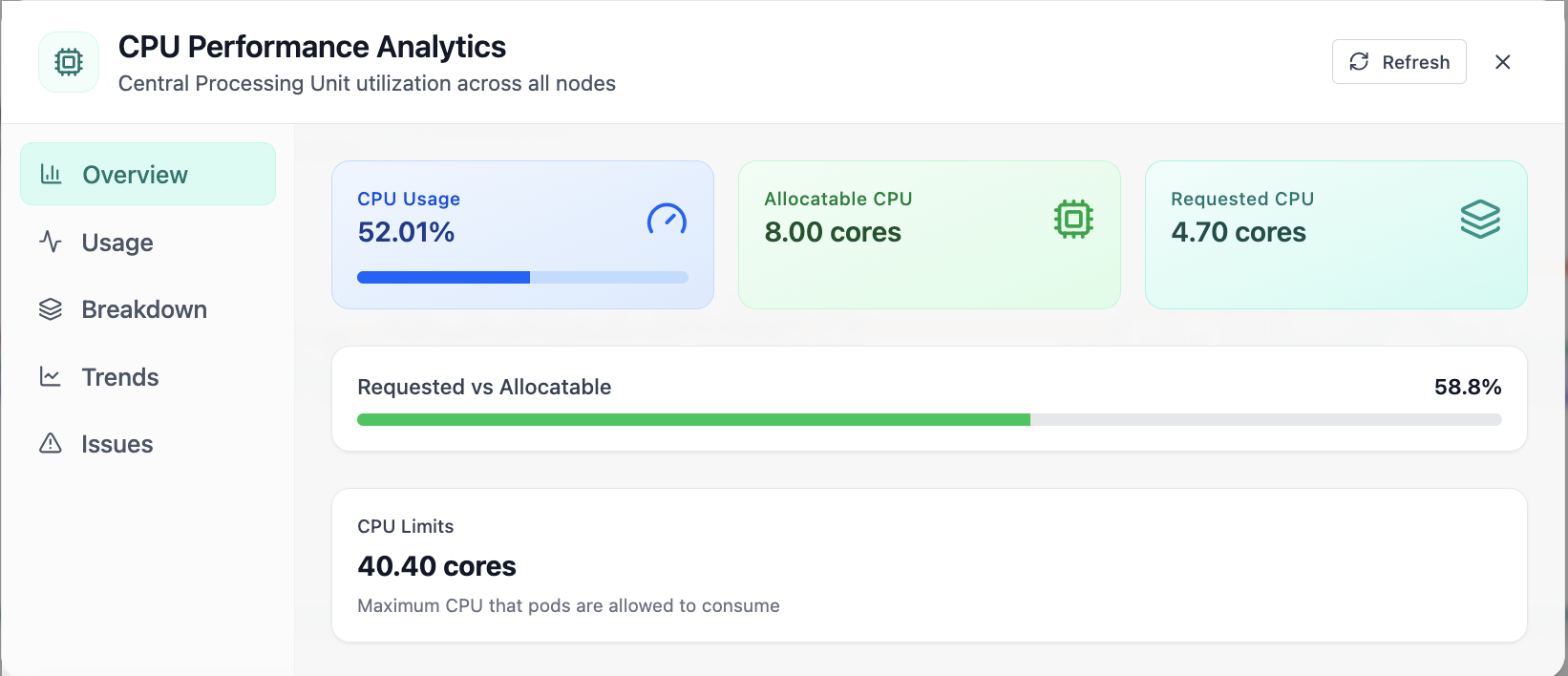
CPU Performance Analytics overview with usage, cores, and limits.
08 of 12 Cloud Admin

CPU Performance · Overview

In CPU Performance, the Overview view answers one operational question at a time—cpu performance analytics overview with usage, cores, and limits. Part of Monitoring workspace; use it when you need evidence before changing limits, scaling, or opening a ticket.

  • KPI strip shows the numbers leadership cares about first
  • Charts link utilization to time so you spot spikes quickly
  • One click into deeper tabs when something looks off

Click the screenshot to open full size, zoom, and pan.

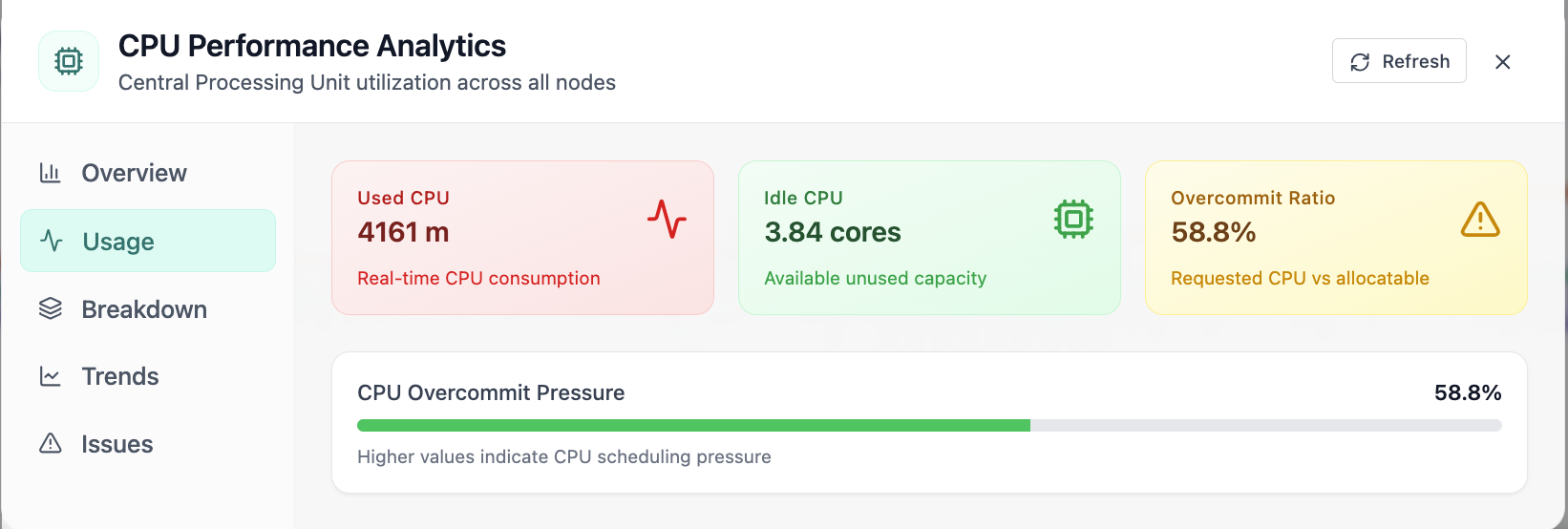
CPU usage tab with used, idle CPU and overcommit ratio.
09 of 12 Cloud Admin

CPU Performance · Usage

In CPU Performance, the Usage view answers one operational question at a time—cpu usage tab with used, idle cpu and overcommit ratio. Part of Monitoring workspace; use it when you need evidence before changing limits, scaling, or opening a ticket.

  • Matches the live Cloud Admin layout your teams will use
  • Dense data stays readable at full size (click to zoom)
  • Fits into the broader FusioNative operational workflow

Click the screenshot to open full size, zoom, and pan.
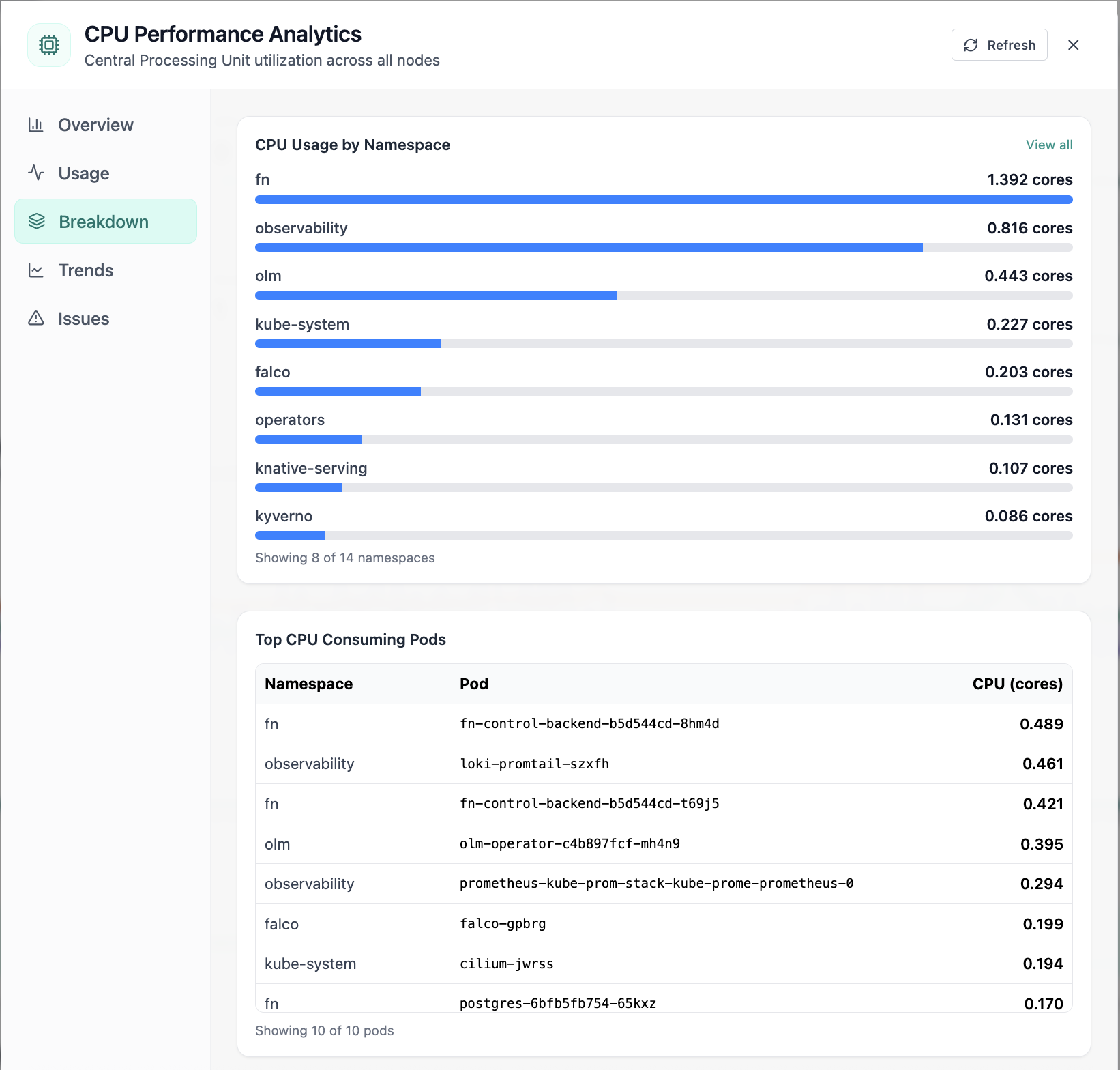
CPU breakdown by namespace and top CPU pods.
10 of 12 Cloud Admin

CPU Performance · Breakdown

In CPU Performance, the Breakdown view answers one operational question at a time—cpu breakdown by namespace and top cpu pods. Part of Monitoring workspace; use it when you need evidence before changing limits, scaling, or opening a ticket.

  • Matches the live Cloud Admin layout your teams will use
  • Dense data stays readable at full size (click to zoom)
  • Fits into the broader FusioNative operational workflow

Click the screenshot to open full size, zoom, and pan.
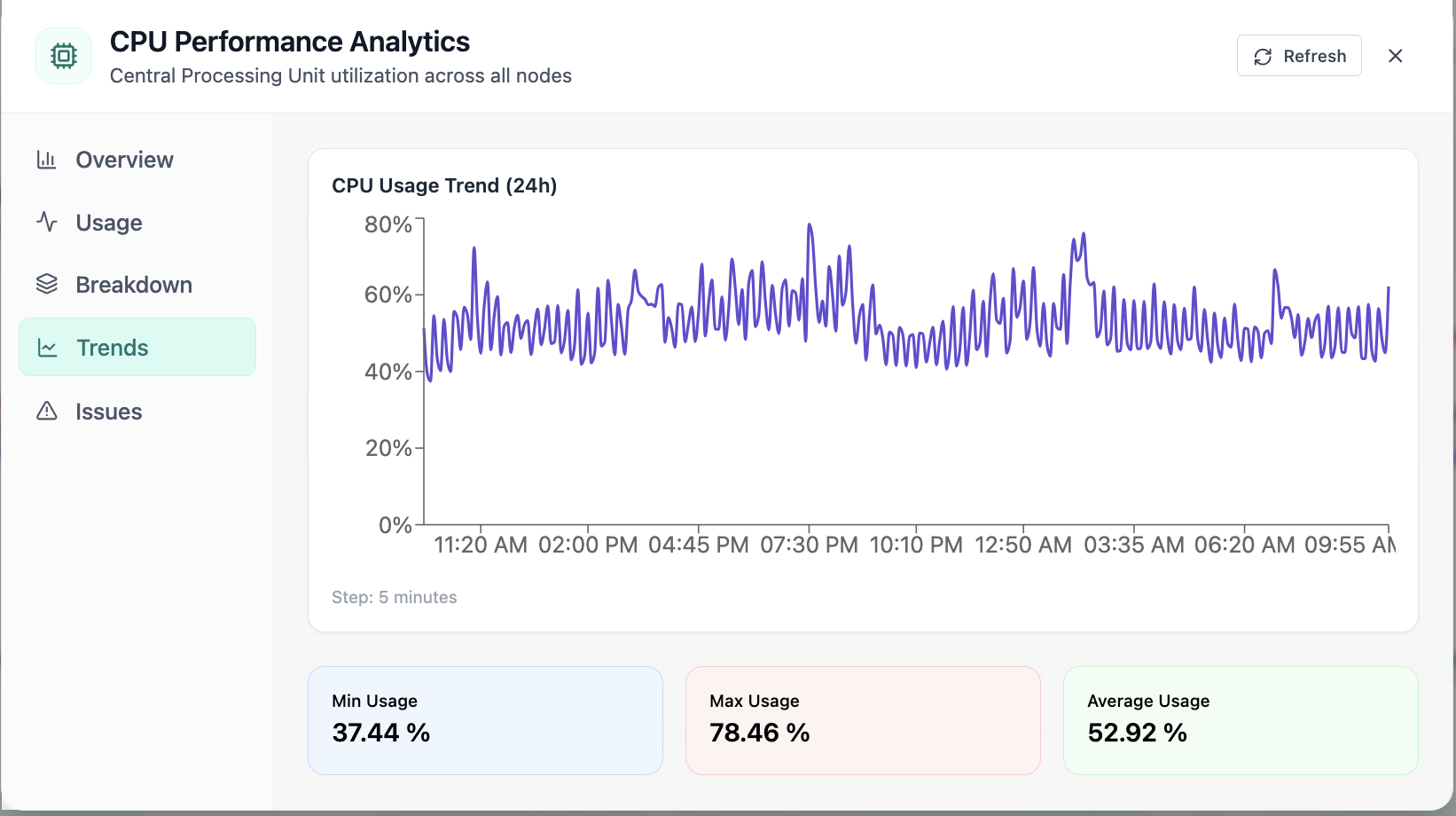
24-hour CPU usage trend chart and statistics.
11 of 12 Cloud Admin

CPU Performance · Trends

In CPU Performance, the Trends view answers one operational question at a time—24-hour cpu usage trend chart and statistics. Part of Monitoring workspace; use it when you need evidence before changing limits, scaling, or opening a ticket.

  • 24h+ history shows normal vs abnormal behavior
  • Compare peaks to limits and headroom
  • Export-friendly view for change windows and capacity reviews

Click the screenshot to open full size, zoom, and pan.
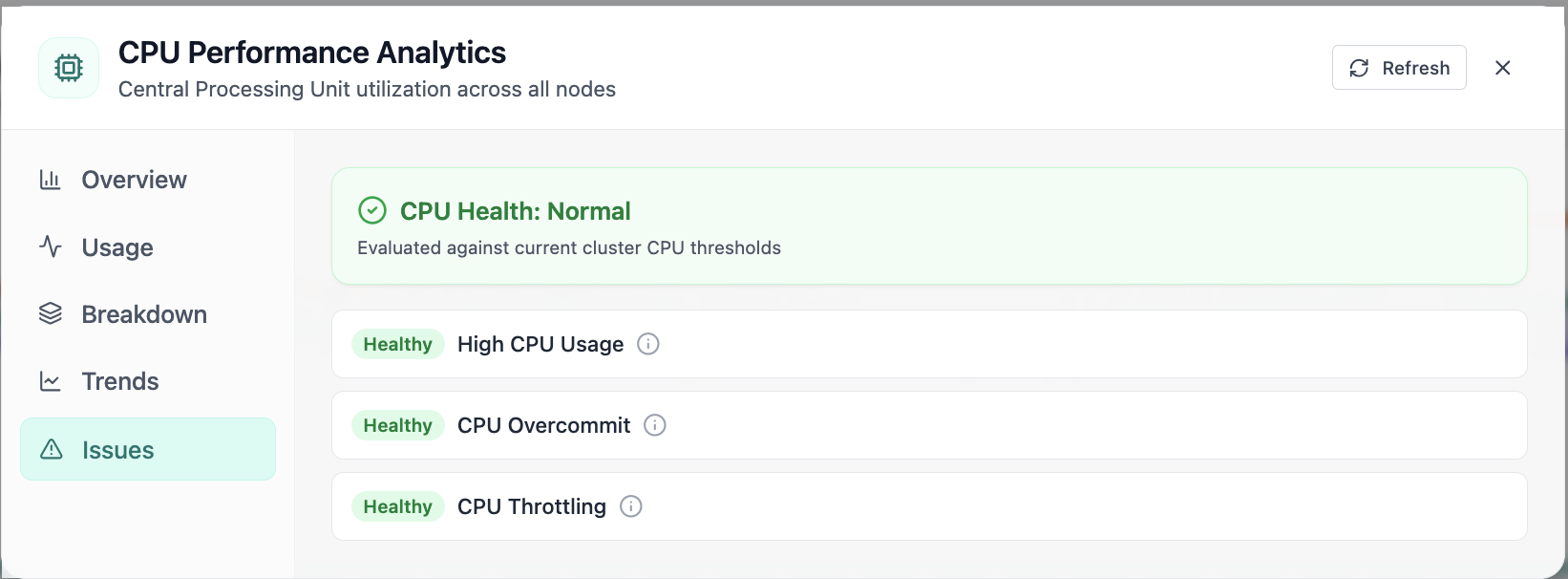
CPU health checks for usage, overcommit, and throttling.
12 of 12 Cloud Admin

CPU Performance · Issues

In CPU Performance, the Issues view answers one operational question at a time—cpu health checks for usage, overcommit, and throttling. Part of Monitoring workspace; use it when you need evidence before changing limits, scaling, or opening a ticket.

  • Problems ranked so the noisiest failures surface first
  • Enough context to assign an owner without opening five tools
  • Clear next step: scale, restart, patch quota, or escalate

Click the screenshot to open full size, zoom, and pan.
Deep dive

From posture check to root cause—without leaving Cloud Admin

Fleet KPIs, saturation charts, flow telemetry, and Prometheus-backed alerts share one investigation cadence: confirm scope, isolate the layer that moved, validate mitigation.

Throughput & top talkers

Slice traffic by cluster total, namespace, node NIC, or workload; correlate spikes with pod-level tables instead of tcpdump theater.

CPU & memory forensics

Allocation donuts, 24h trends, namespace and node breakdowns, plus ranked pods—ideal when HPA metrics disagree with user-visible latency.

Alerts grounded in metrics

Alert summaries pair severity counts with the charts that explain them—fewer circular conversations about “whether Prometheus fired.”

Infrastructure tables inline

Nodes, namespaces, controllers, ConfigMaps, Secrets, NetworkPolicies, and Services appear beside charts—no separate CMDB hunt mid-incident.

See Monitoring & Ops on your clusters

Walk the Observability workspace with your metrics—or explore use cases on the homepage.

Get Demo